
Awesome Clock1.1 - App Store
You'll be able to see results in few seconds.
Publisher Description
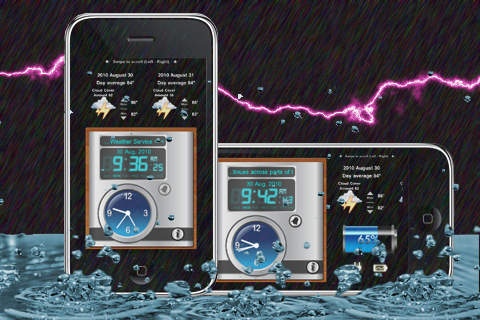
Finally, after much request, an alarm clock in your iPhone that is both filled with functionality and beautiful!
Battery information in landscape mode
Talking clock
Brightness adjuster (sliding your finger in the screen)
Real time local weather information.
Digital and analog display
Quality graphic interface by Danielo Lipele.
Touch Screen for "talking time".
Landscape and portrait orientations are supported.
You can set up unlimited alarms, personalizing the name, sound, snooze feature and snooze delay.
Shake to turn flashlight on/off
Landscape mode enabled
Slide finger up/down to adjust brightness.
Show seconds on/off
Set up iPod songs as your alarm
24-hour Time on/off
Show weekday on/off
NEWS TICKER on/off
Background image from: Image Library/Photo Folder or Camera
Snooze mode for alarms.
Additional Features:
NEWS TICKER: We provide a very nice scrolling marquee with recent Weather information around the world provided live from the NOAA's National Weather Service Headlines feed
Different types of Alarms. Not only does this application include different sounds to choose from for the alarm; it also includes these two options that no other application out there has:
Alarm: You can select the sound from our library, or you can select MUSIC from your native iPod application.
Personal Background. With this application you will have the option to select the picture for the alarm clock background. The possibilities are endless! You can be as naughty or nice as you want. Select from some of the basic options we have included or any picture from your photo library/Camera. Just image having a wallpaper of your platonic hottie in your clock, Just use your imagination... This is the only app that will let you put ANY picture in the background.
Font Choices. Change the color of the font of the clock to fit your mood and personality!
Weekly "day" notifier. Unlike most clocks and calendar applications out there; this applications has both included! Why go through the hassle of loading different applications for similar tasks? Here you have it all!
We are sure you will enjoy this application and find it very useful! Furthermore, we are constantly working on this and other applications; please feel free to share with us any ideas or suggestions you may have!
Requires iOS 3.1.3 or later. Compatible with iPhone, iPad, and iPod touch.
About Awesome Clock
The company that develops Awesome Clock is Gp Imports Inc, Software Development. The latest version released by its developer is 1.1.
To install Awesome Clock on your iOS device, just click the green Continue To App button above to start the installation process. The app is listed on our website since 2010-09-07 and was downloaded 0 times. We have already checked if the download link is safe, however for your own protection we recommend that you scan the downloaded app with your antivirus. Your antivirus may detect the Awesome Clock as malware if the download link is broken.
How to install Awesome Clock on your iOS device:
- Click on the Continue To App button on our website. This will redirect you to the App Store.
- Once the Awesome Clock is shown in the iTunes listing of your iOS device, you can start its download and installation. Tap on the GET button to the right of the app to start downloading it.
- If you are not logged-in the iOS appstore app, you'll be prompted for your your Apple ID and/or password.
- After Awesome Clock is downloaded, you'll see an INSTALL button to the right. Tap on it to start the actual installation of the iOS app.
- Once installation is finished you can tap on the OPEN button to start it. Its icon will also be added to your device home screen.
Program Details
System requirements
Download information
Pricing
Version History
version 1.1
posted on 2010-09-07
Disclaimer
Official App Store Link
We do not host Awesome Clock on our servers. We did not scan it for viruses, adware, spyware or other type of malware. This app is hosted by Apple and passed their terms and conditions to be listed there. We recommend caution when installing it.
The App Store link for Awesome Clock is provided to you by apps112.com without any warranties, representations or guarantees of any kind, so access it at your own risk.
If you have questions regarding this particular app contact the publisher directly. For questions about the functionalities of apps112.com contact us.
